Market Brief AI vs TradingView: on-device crypto HMM regimes vs multi-asset charting
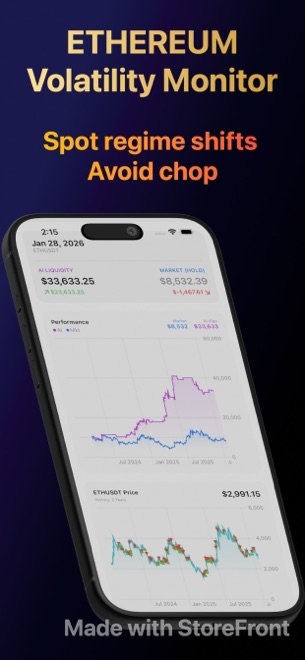
TradingView is the stronger workstation when you chart equities, forex, futures, and multi-exchange crypto pairs with manual drawing tools, custom Pine Script indicators, and server-side webhook alerts. Market Brief AI is purpose-built for iPhone and iPad researchers who want four Hidden Markov Models (Hera, Metis, Hestia, and Athena) fitted locally to public Binance USDT history, Core ML FinBERT sentiment scoring, and one-tap closed-bar backtests against buy-and-hold—strictly for educational simulation, not financial advice.
1. Statistical regime probabilities vs discretionary chart drawing
TradingView gives discretionary analysts an open canvas: trendlines, Fibonacci retracements, hundreds of community indicators, and custom Pine Script code across thousands of global tickers. However, Pine Script does not ship native expectation-maximisation Hidden Markov Models out of the box, leaving regime classification to lagging moving-average or volatility approximations unless you maintain external data pipelines.
Market Brief AI narrows the scope to Binance USDT spot crypto pairs and treats market state estimation as a first-class mathematical workflow on iOS 26 and iPadOS 26. It fits Hera (3-state HMM), Metis (input-aware), Hestia (duration-aware), or Athena (factorial multi-layer HMM) directly on your device, colouring every bar by bull and bear regime probability.
| Capability | Market Brief AI (iPhone & iPad) | TradingView (Web, Desktop & Mobile) |
|---|---|---|
| Asset coverage | Crypto spot pairs quoted in USDT on Binance (daily back to 2017, recent 1h & 5m) | Global equities, ETFs, forex, futures, indices & multi-exchange crypto |
| Native Hidden Markov Models | Built in: Hera (Free), Metis & Hestia (Plus), Athena factorial HMM (Pro) | Not built in; requires custom Pine approximations or external Python scripts |
| Manual chart drawing & custom code | Focused regime/backtest screen with toggleable signals & guards (no scripting) | Full drawing suite plus Pine Script editor & community indicator library |
| Macro & event context overlays | Named public-data agents: Kronos (BLS CPI), Zeus (S&P 500), Demeter (Fed), quakes & seasons | Economic calendar & multi-symbol chart overlays |
| News sentiment scoring | Local Core ML FinBERT model scoring public GDELT headlines + custom sentences | Headline feed widget without local transformer sentiment scoring |
2. Closed-bar backtesting, execution logs, and account privacy
TradingView’s Strategy Tester evaluates Pine Script rules across chart bars in the cloud and supports broker integrations or webhook forwarding. Market Brief AI deliberately omits broker links, webhooks, and live order routing: it simulates BUY, SELL, and WAIT decisions with closed-bar semantics from $100 to $1B starting test capital and plots the purple strategy curve directly over passive blue buy-and-hold.
Privacy architecture differs just as sharply. TradingView requires a user account to save layouts, watchlists, and scripts on its servers, whereas Market Brief AI runs with zero account sign-in, zero analytics SDKs, zero ad networks, and local storage that stays readable offline after syncing.
| Dimension | Market Brief AI | TradingView |
|---|---|---|
| Backtest benchmark visual | Side-by-side purple strategy curve vs blue buy-and-hold curve on every run | Strategy Tester metrics tab; buy-and-hold comparison available in report |
| Risk guards & auction layers | Pro adds flash-crash, EMA crash, CUSUM drift, hard stop & 5 auction signals | Coded per strategy in Pine Script or configured via indicator settings |
| Trade execution log | Pro unlocks full local log showing every simulated trade and firing rule | List of Trades tab inside Strategy Tester |
| Account & cloud storage | No account, no email, no analytics SDK; models & history stored on device | Account required for saved charts, alerts, and synced layouts |
| Live brokerage / webhook trading | Never (strictly educational strategy simulation, not financial advice) | Supported via integrated brokers and webhook alerts on paid plans |
3. Subscription tiers and when to pair both apps
Many systematic crypto researchers keep both tools on an iPad: TradingView for multi-exchange order-book comparisons, custom Pine visuals, and non-crypto macro tickers, alongside Market Brief AI for fast local HMM fitting and closed-bar regime stress tests without writing code.
On cost, Market Brief AI’s free tier has no ads, watermarks, or time limits for Hera backtests, while Plus ($7.99/mo or $79.99/yr, 7-day trial) and Pro ($12.99/mo or $129.99/yr, 3-day trial) cost less than typical multi-chart desktop workstation tiers.
| Workflow goal | Best-fit tool | Reason |
|---|---|---|
| Drawing support/resistance across stocks, FX, and 20 crypto exchanges | TradingView | Broad multi-asset feeds and full manual drawing toolkit |
| Fitting 3-state, duration, or factorial HMMs on iPhone without coding | Market Brief AI | Hera, Metis, Hestia, and Athena fit locally in seconds on iOS 26+ |
| Testing whether a crypto regime setup actually beat passive holding | Market Brief AI | Instant closed-bar replay against buy-and-hold from $100 to $1B test capital |
| Server-side price alerts and Pine Script webhook automation | TradingView | Market Brief AI requests zero notification permissions and never routes orders |
| Zero-account, ad-free mobile research stored privately on device | Market Brief AI | Free tier has no login, no ads, and offline access to synced models |
Can Market Brief AI send TradingView-style webhook alerts to an exchange?
No. Market Brief AI is a read-only analytical and strategy-simulation app with no brokerage links, webhooks, or notification permissions. Nothing it displays is financial advice.
Does Market Brief AI support stocks or forex like TradingView?
No. Market Brief AI analyses Binance USDT crypto spot pairs only, though its Pro Zeus agent brings S&P 500 public context into crypto regime analysis.
Is the Hera Hidden Markov Model free in Market Brief AI?
Yes. Fitting the 3-state Hera model, viewing regime probabilities, running closed-bar backtests against buy-and-hold, and using free context agents cost $0 with no ads or account.
What iOS version does Market Brief AI require?
Market Brief AI v1.1 runs natively on iPhone and iPad running iOS 26 or iPadOS 26 and later.